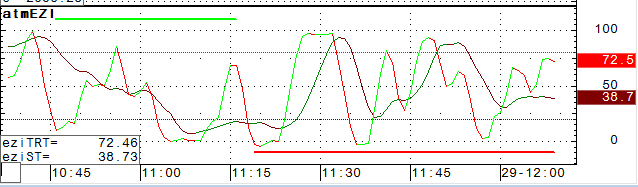
ATM EZ Indicator is similar to ATM Trigger, as both have two oscillating lines and a horizontal strength line.
The indicator has three components:
•ST (slow oscillator) = identifies the area where an Elliott Wave Two or Four ends
•TRT (fast oscillator) = used to verify the validity of the ST on a smaller time frame chart
•TSB = strength line
Additionally, three OB/OS lines can be added to the display: Hi, Lo, Zero.
The ATM First Alert can be used similarly by setting the type to either ST or TRT.
Line color and thickness can be changed in preferences.
Entry Zone Indicator parameters
|
Parameter |
Description |
|
Display |
Opens sub-window to set parameters for TRT, ST, and TSB: •Color1 = Line color for TRT and ST going up. •Color2 = Line color for TRT and ST going down. •Weight = Line thickness. •Enable = Turns line on and off. |
|
OB/OS |
Opens sub-window with overbought and oversold parameters: •Color = Select a color for the line. •Weight = Choose a thickness for the indicator. •Type = Choose fixed or dynamic. Fixed = uses Level as a fixed OB/OS value. Dynamic = uses Standard Deviation and Lookback for a dynamic OB/OS value: OB: MA(@,Sim,lookback) + factor * STDDEV(@,lookback) OS: MA(@,Sim,lookback) - factor * STDDEV(@,lookback) where @ is the study •Std Dev = Multiplier used to calculate high and low. •Lookback = Number of bars to compare to the current bar. •Level = Percentage of average OB/OS used to calculate predictor Ob/OS levels. •Display = Select this check box to display the component. •Style = Choose a line style. |